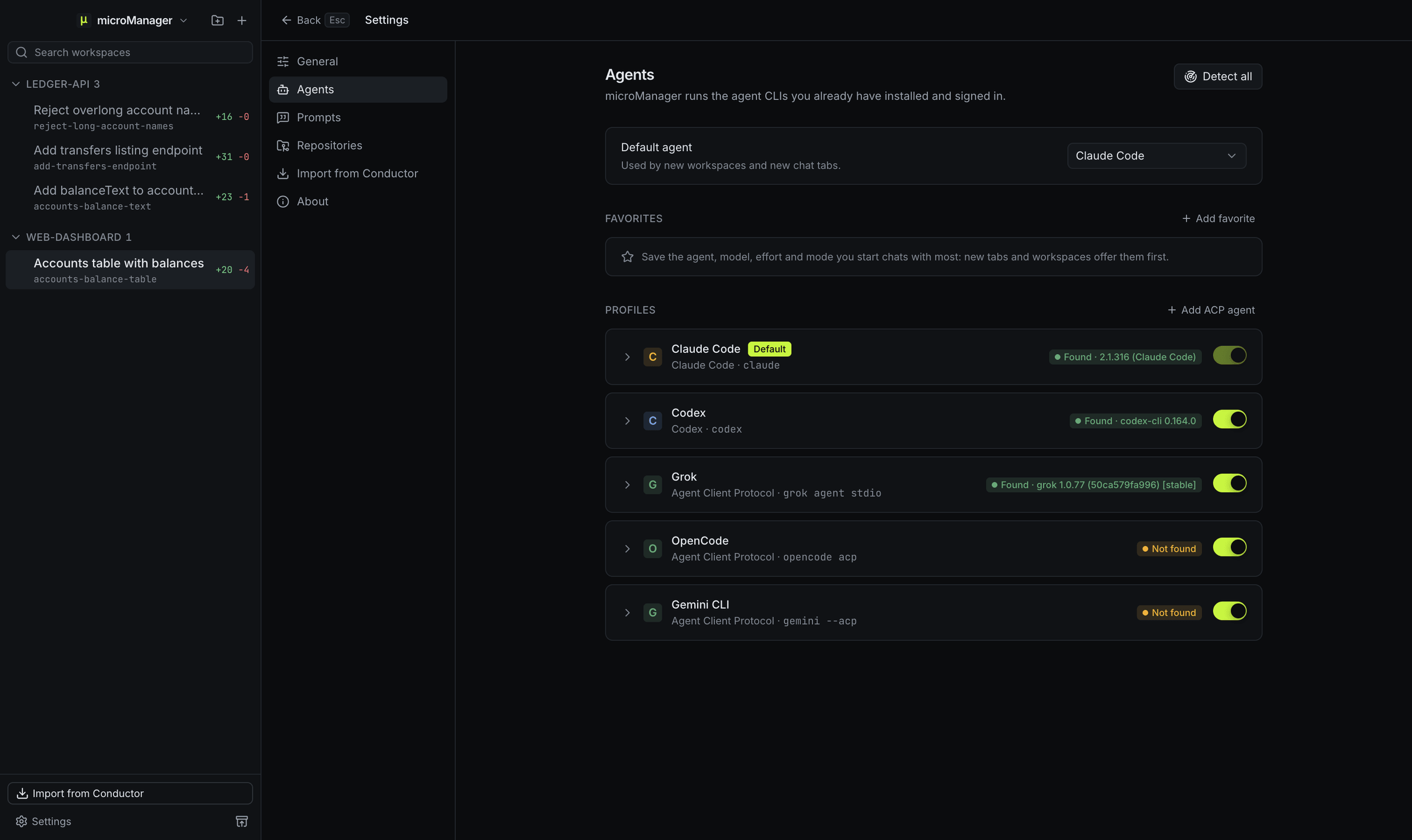
Which agent profiles are built in?
| Profile | Kind | Command | How microManager talks to it |
|---|---|---|---|
| Claude Code | claude | claude |
The Claude Agent SDK, pointed at your own claude CLI or wrapper script |
| Codex | codex | codex |
codex app-server over stdio (JSON-RPC); codex exec --json as a fallback |
| Grok (for Grok Build) | acp | grok agent stdio |
Agent Client Protocol, natively |
| OpenCode | acp | opencode acp |
Agent Client Protocol |
| Gemini CLI | acp | gemini --acp |
Agent Client Protocol |
Built-in profiles can be edited and turned off, but not deleted.
What does a profile contain?
- Kind:
claude,codexoracp, which decides how microManager talks to the agent. - Command: an absolute path, or a name looked up on your login shell’s
PATH. - Arguments and environment variables added when the agent starts.
- Models, one id per line, with a default model, and a default effort from the levels its kind offers.
- On or off, so you can hide an agent you do not use.
How does microManager find each agent’s command?
It captures the environment of your login shell, and captures it again when you choose Detect or Detect all, so a claude or codex installed with Homebrew, npm, nvm or mise is found the way your terminal finds it. Settings → Agents shows, for each profile, Found with its version (hover for the resolved path), Not found, or Not working when the command exists but its version check fails (hover for the reason). Detect next to a profile’s command checks it again, and Detect all checks every profile.
For Codex, when codex turns out to be the npm launcher script, microManager runs the native Codex binary that the package installs beside it.
You can point a profile at a wrapper script instead of the agent itself, for example one that sets a proxy or picks an account. When you import from Conductor, the Claude Code, Codex and OpenCode paths set in Conductor’s settings become the commands of those profiles.
Which models and effort levels can I pick?
- Claude Code:
opus,sonnet,haikuandfable, plus any model id you type. Effort: low, medium, high, xhigh and max. - Codex: the models in Codex’s own model cache (
~/.codex/models_cache.json), refreshed from the app-server once a Codex chat starts, plus any model id you type; yourconfig.tomlmodel and effort are the defaults. Effort: low, medium, high, xhigh, max and ultra, as far as the chosen model supports them. - ACP agents: the models each agent offers over the protocol.
The model and effort pickers sit along the bottom of the message box, so you can change them per chat.
What are the permission modes?
Each chat has a mode, picked at the bottom of the message box: Ask first (the agent asks before editing files or running commands), Accept edits (it edits files in the workspace without asking, and asks before commands and before writing anywhere else), Plan (it reads and plans, and changes nothing), Auto (a reviewer model approves or blocks each action for you: Claude Code’s auto mode and Codex’s auto review) and Bypass permissions (it runs everything without asking).
New chats start in the agent’s own default: for Claude Code that is permissions.defaultMode from its settings (the workspace’s .claude/settings.local.json, then .claude/settings.json, then your own ~/.claude/settings.json), otherwise Ask first. To pick one yourself, set New chats start in on the agent in Settings → Agents. When an agent asks, a card in the chat shows what it wants to do with the agent’s own choices: Claude Code offers Allow, Deny and, when it suggests one, an always-allow rule such as Allow all edits this session; Codex offers Allow once, Allow for this session and Reject.
ACP agents decide for themselves whether to ask, and have no Auto mode. microManager answers their requests by the mode: it allows everything in Bypass permissions and edits to files in the workspace in Accept edits, each time for that one action only. When an agent offers only an “always allow”, which it would keep after you change the mode back, you get the question instead. An agent whose own settings approve everything, as Grok Build can be set to, never asks. Plan is offered only to an agent with a plan mode of its own; for an agent with no modes at all, such as Grok Build, the mode picker says so.
How do I add another ACP agent?
In Settings → Agents, choose Add ACP agent: give it a name, the command that starts it in ACP mode and any arguments, then add environment variables or models in its profile if it needs them. It then appears in the agent picker for new chats and workspaces like the built-in ones. See ACP agents for what the protocol gives you.
Are my agents’ own settings respected?
Yes. microManager starts the agent CLIs you installed and signed in to, with their normal configuration. Claude Code loads your user settings, and the repository’s project and local settings (CLAUDE.md, permissions, hooks and MCP servers) once you trust the repository; repositories imported from Conductor come in trusted. Codex uses your Codex configuration. microManager adds its own micromanager MCP server and a short note about the workspace to each session; it does not replace your setup.