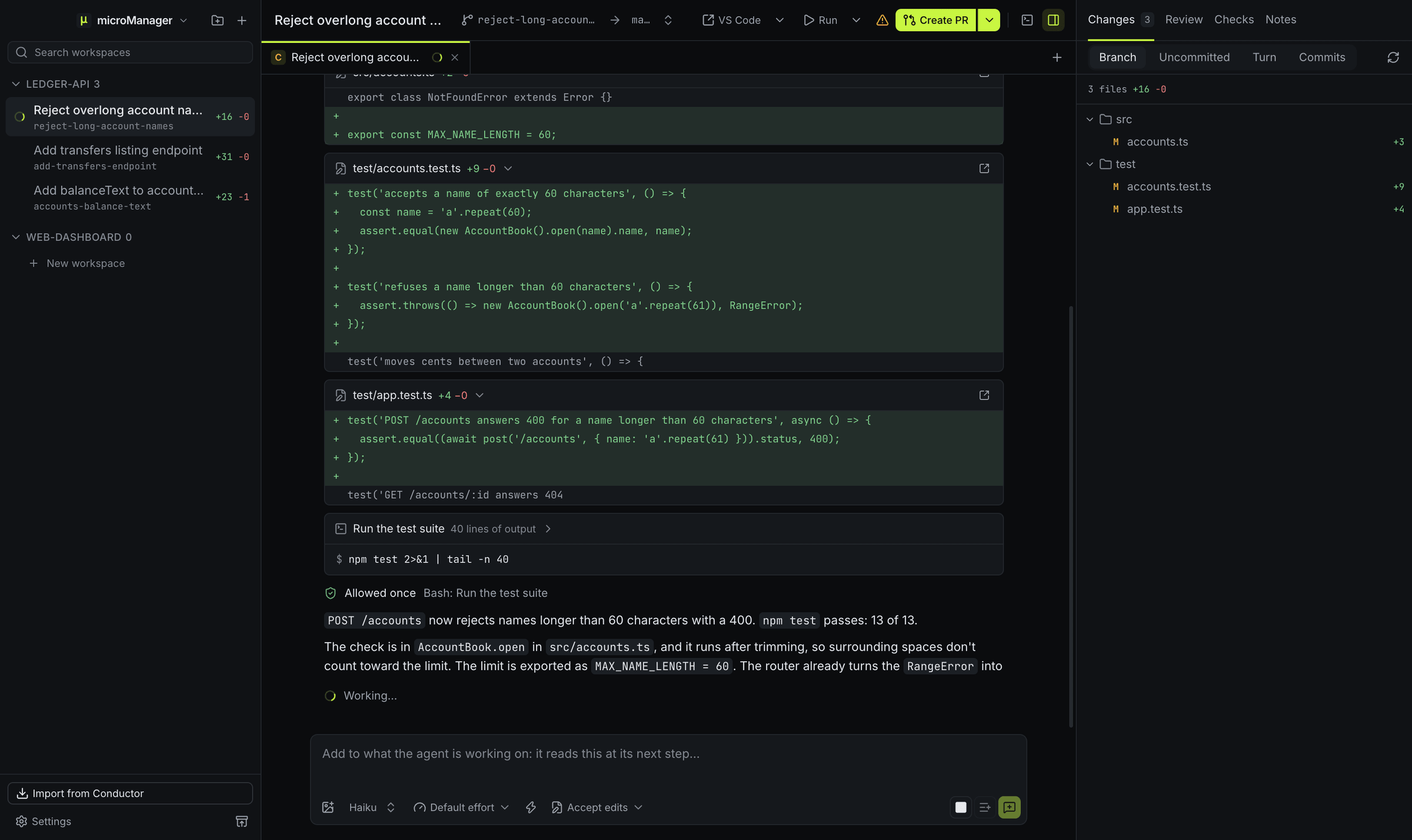
How do I run several Claude Code agents at once?
Create a workspace for each task (⌘N, or Ctrl+N on Windows and Linux) and pick Claude Code. Each workspace is its own git worktree on its own branch, so the sessions never edit the same files, and each can have more chat tabs (⌘T) for a second Claude working beside the first. The sidebar shows which sessions are working, which need an answer and which are done, and a notification tells you when one finishes. See parallel agents.
How does microManager run Claude Code?
Each chat tab is a Claude Code session started through the Claude Agent SDK, with the SDK pointed at your claude executable: the one on your login shell’s PATH, or a wrapper script you choose. The session runs in the workspace’s worktree with the workspace’s environment, loads your user settings, and the repository’s project and local settings once you trust the repository, and keeps Claude Code’s own system prompt. microManager appends a short note about the workspace: its name and folder, the repository’s main checkout, the branch and its target branch, the shared .context/ folder, the reserved ports and its own tools, then your general prompt from Settings → Prompts.
Which models and effort levels can I use?
The model picker offers opus, sonnet, haiku and fable, and accepts any model id you type, so new models work the day your Claude Code supports them. Effort goes from low through medium, high and xhigh to max. Both can change per chat.
How do permissions and questions show up?
Pick a permission mode per chat: Ask first, Accept edits, Plan, Auto (Claude Code’s own reviewer model decides each request) or Bypass permissions. New chats start in the permissions.defaultMode of your Claude Code settings, or in the mode you set for Claude Code in Settings → Agents. When Claude Code asks to use a tool, a card shows what it wants to do, with Allow, Deny and, when Claude Code suggests one, an always-allow choice such as Allow all edits this session. At the end of planning, Approve plan or Keep planning answers its plan. When it uses its AskUserQuestion tool, you get a card with its options (single or multiple choice, or your own text), and your answer goes straight back to it.
What else does a Claude Code chat show?
Streamed replies with formatted code, its thinking (collapsed), a card per tool call (commands with output, edits as diffs, searches, subagents), its to-do list while it works, and each turn’s duration, tokens and cost. Esc stops a turn; checkpoints before every message let you roll a turn back, and the session rewinds with it when your Claude Code version supports that.
Can I use a wrapper script instead of claude?
Yes. Set the Claude Code profile’s command to any executable that behaves like claude, such as a script that sets a proxy or chooses an account. If Conductor was set up with a custom Claude Code path, the import uses it.
What tools does Claude get from microManager?
The micromanager MCP server runs inside the session, so Claude can call GetWorkspaceDiff, DiffComment, GetDiffComments, GetTerminalOutput and GetWorkspaceInfo. For questions it uses its own built-in AskUserQuestion. See MCP tools.
What do I need?
Claude Code installed and signed in, so that claude works in your terminal. On Windows, Claude Code runs its shell commands in Git Bash when Git for Windows is installed, and in PowerShell otherwise. Then add a repository, press ⌘N (Ctrl+N on Windows and Linux) and pick Claude Code.