Why run agents in parallel?
A coding agent spends most of a turn working on its own: reading code, running tests, editing files. While one agent works on a bug fix, another can add a feature and a third can write tests. Running them side by side turns that waiting time into progress on other tasks, and you spend your own time reviewing and steering instead of watching.
The catch is isolation. Two agents editing the same checkout overwrite each other’s files and confuse each other’s test runs. microManager gives each task its own git worktree, so agents work in separate folders on separate branches of the same repository.
How do I keep track of many agents?
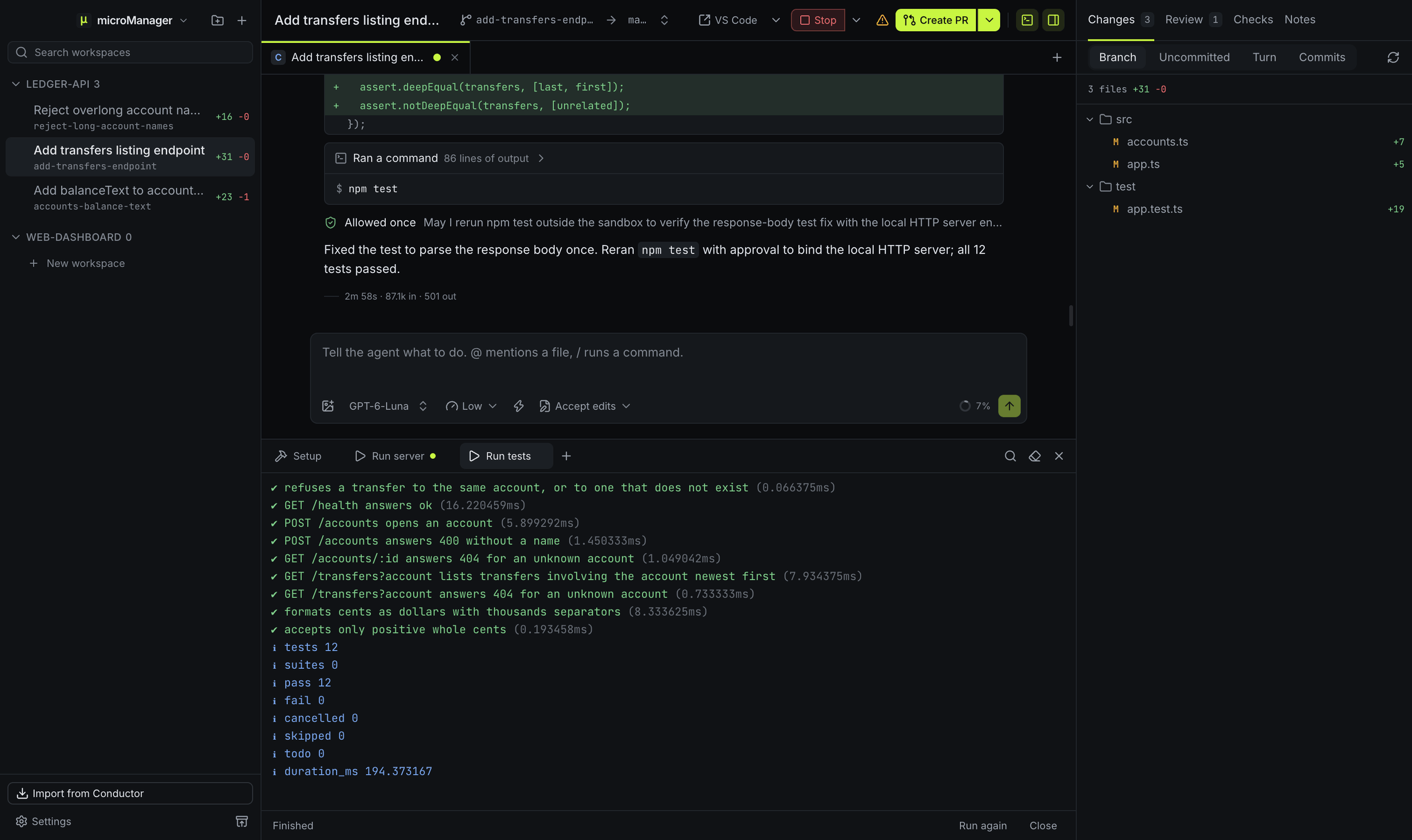
The sidebar groups workspaces by repository and marks each one:
- a spinner while an agent is working,
- a mark when it is waiting for your answer or permission,
- an error mark when a turn failed,
- a dot for replies you have not read, and
- a check when you have marked the workspace Done or its pull request is merged.
It also shows each workspace’s branch, how many lines it has changed and its pull request state. Pin the workspaces you care about most; the rest sort by latest activity. ⌘1 to ⌘9 and the ⌘K command palette jump between them (Ctrl instead of ⌘ on Windows and Linux).
Will I miss it when an agent finishes?
No. When a turn ends or an agent needs input, and the window is in the background or you are looking at another workspace, microManager sends a system notification, with an optional sound. The app’s icon shows how many workspaces need you: a count on the Dock icon on a Mac and in Linux launchers that show one, and a dot on the flashing taskbar button on Windows. Keep the computer awake, on by default, stops your computer from sleeping while any agent is working, so long jobs are not paused.
Can one workspace have several chats?
Yes. Press ⌘T (Ctrl+T on Windows and Linux) for a new tab. Each tab is its own agent session with its own agent, model, effort level and permission mode, all working in the same worktree. Use one tab to implement and another to review, or give a second agent a narrower job without cluttering the first chat.
What does each chat show?
Messages and replies with formatted code, the agent’s thinking (collapsed), a card for each tool call (commands with their output, file edits as small diffs, searches, subagents and MCP calls), the agent’s to-do list while a turn runs, and cards for permission requests and questions. Each turn ends with its duration, tokens and cost when the agent reports them.
Can I talk to an agent while it works?
Yes. With Claude Code and Codex, a message you send during a turn is added to that turn: the agent reads it at its next step and carries on with it, so you can correct course without stopping the work. Alt+Enter queues the message for when the turn ends instead, and Settings → General can make queueing the default. Other agents always get it queued. You can edit or delete queued messages, add one to the running turn later, or choose Send now to interrupt the turn and send immediately. Esc in an empty message box stops the running turn.