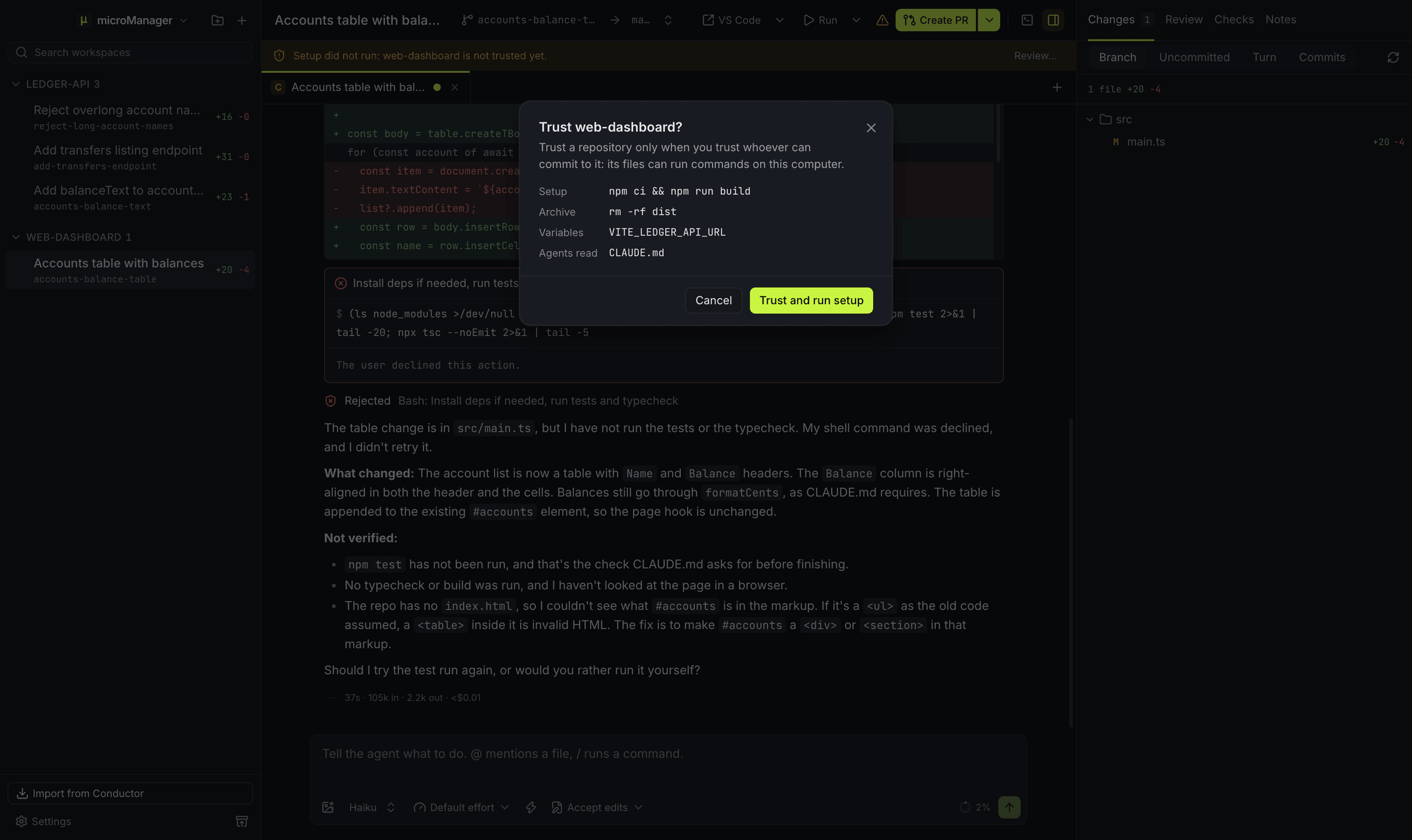
Where do scripts come from?
From the repository’s settings files, highest precedence first: overrides you make in microManager, .micromanager/settings.local.toml, .micromanager/settings.toml, .conductor/settings.local.toml, .conductor/settings.toml, then the older conductor.json. Repository settings in microManager show each script together with the file it came from. The full list of keys is on the repository settings page.
Why did a script from the repository not run?
Anyone can commit a settings file, and its scripts and variables run on your computer, so microManager uses what a repository’s own files ask for only once you trust that repository. Until then, new workspaces start without its setup script, archiving skips its archive script, its environment_variables are left out, Claude Code reads only your own settings, not the repository’s CLAUDE.md, .claude folder (hooks and permission rules) or .mcp.json, OpenCode reads none of its project config (opencode.json, the .opencode folder with its plugins) or instructions, and git runs none of the programs the repository’s own .git/config names (an fsmonitor hook, filter commands) or its hooks. A clone never brings those along, but a folder copied from elsewhere can. The New workspace dialog lists what the files ask for, with a switch to trust the repository, and a bar in each of its workspaces offers Review…, which shows the same list before you trust it. You can trust a repository, or stop trusting it, under Settings → Repositories → Trust. Codex, Gemini CLI and Grok Build keep their own list of folders you trust and ask about each one themselves. Scripts you set in microManager itself always run, run scripts start only when you press Run, and repositories imported from Conductor come in trusted.
How does the setup script run?
Right after a workspace’s worktree exists, and again when you restore an archived workspace, microManager runs scripts.setup in a Setup terminal you can open from the terminal drawer (⌘J, or Ctrl+J on Windows and Linux). It runs in the background: the workspace is usable at once and agents can start working while it runs. While it runs, and if it fails, a bar above the chat says so, with Show output and, after a failure, Run again. Its log is kept, so the drawer can show it after a restart, and Run setup again in the drawer (or Run the setup script again in the ⌘K command palette) runs it once more.
# .conductor/settings.toml or .micromanager/settings.toml
[scripts]
setup = "pnpm install --frozen-lockfile"
How do run scripts work?
Every scripts.run.<id> table is a run script. The Run button in the workspace header starts the default one (marked default = true, otherwise the first) and becomes Stop while it runs; its menu starts or stops each script and has Stop all run scripts.
[scripts.run.dev]
command = "pnpm dev --port $MICROMANAGER_PORT"
default = true

[scripts.run.storybook]
command = "pnpm storybook --port $((MICROMANAGER_PORT + 1))"
A run script runs in its own terminal tab, such as Run dev. On macOS and Linux, Stop sends SIGINT to the script’s whole process group and, if it is still running after 5 seconds, SIGKILL; on Windows it ends the script’s whole process tree. Agents can read the output with the GetTerminalOutput tool, which helps when you ask one to fix a failing dev server.
Run scripts merge by id across the settings files, field by field, so .conductor/settings.local.toml can change just one field of a shared script: hide = true leaves a script out of the Run menu on your machine, and default = true makes another one the default.
# .conductor/settings.local.toml
[scripts.run.storybook]
hide = true
An older single-string form still works and becomes one script called default:
[scripts]
run = "npm run dev"
What does run_mode do?
scripts.run_mode = "nonconcurrent" lets only one workspace of the repository run a given script at a time: starting it in one workspace first stops it in the others. Use it when the script needs a fixed port or another resource that cannot be shared. The default, "concurrent", lets every workspace run it at once, which works well when each script uses its own $MICROMANAGER_PORT.
What does the archive script do?
scripts.archive runs when you archive a workspace, after its agents and terminals stop and before its folder is removed, with up to 2 minutes to finish and no terminal. If it fails, the archive still goes ahead. Use it to stop containers, drop a per-workspace database or delete caches outside the worktree.
[scripts]
archive = "docker compose -p \"$MICROMANAGER_WORKSPACE_NAME\" down -v"
Which shell and environment do scripts get?
Scripts run in the workspace folder. On macOS and Linux they run with your $SHELL -c when it is zsh or bash, otherwise with zsh -c on macOS and bash -c on Linux, and they get the environment of your login shell, so tools installed with Homebrew, nvm, mise or asdf are on the PATH. On Windows they run in Git Bash when Git for Windows is installed, so the same bash scripts work, and otherwise in PowerShell, with the environment Windows gives apps. Every script also gets the workspace variables: MICROMANAGER_WORKSPACE_NAME, MICROMANAGER_WORKSPACE_PATH, MICROMANAGER_ROOT_PATH, MICROMANAGER_DEFAULT_BRANCH, MICROMANAGER_PORT and the rest, listed on the environment variables page. Agents and terminals get the same environment.
Variables of your own go in an [environment_variables] table of any settings file. A file’s [environment_variables.local] table wins over its shared table, [environment_variables.cloud] is left out (every microManager workspace is local), and a higher file wins over a lower one, name by name. They come after your login environment and never replace the workspace variables. Settings → Repositories lists the ones in effect.
[environment_variables]
API_URL = "https://staging.example.com"

[environment_variables.local]
API_URL = "http://localhost:4000"
Will my Conductor scripts work unchanged?
Yes, for local scripts. microManager reads .conductor/settings.toml, .conductor/settings.local.toml and conductor.json as they are, and with Conductor-compatible environment on (the default), it sets the CONDUCTOR_* variables Conductor gave local workspaces alongside their MICROMANAGER_* twins, with the meanings they had in Conductor: $CONDUCTOR_WORKSPACE_NAME is built from the workspace’s name the way Conductor built it, and $CONDUCTOR_DEFAULT_BRANCH is the target branch. Two things differ: an imported workspace gets a new block of ports, so $CONDUCTOR_PORT changes, and Conductor’s cloud and API variables (CONDUCTOR_API_KEY, CONDUCTOR_SESSION_ID and the like) are not set. Run actions with args and options.cwd work too, and an action limited to Conductor’s cloud is left out. microManager never writes to these files. On Windows and Linux, a script that calls a macOS-only command such as open, pbcopy or brew needs an equivalent there; put that version in .micromanager/settings.local.toml on the machine that needs it.